在 Cursor 中配置和使用子代理
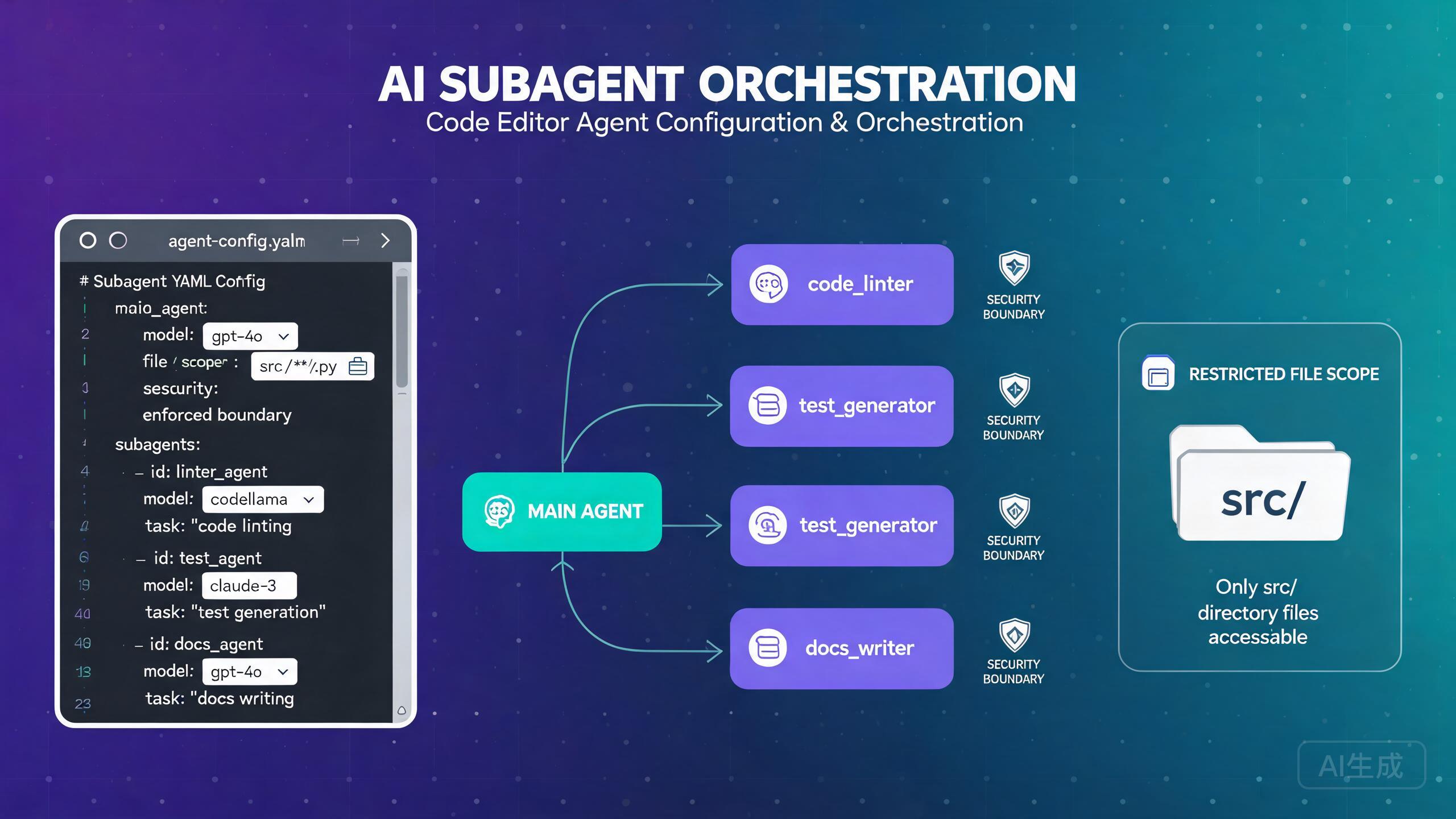
Cursor 中的子代理允许你将复杂任务分解为更小的、专门的单元,这些单元可以并行或顺序运行。规划器代理编排整体任务,而子代理使用自己的模型、范围和安全边界处理特定子任务。本指南涵盖从模型选择到安全配置的所有内容,帮助你构建健壮的多代理工作流。
理解子代理
什么是子代理?
子代理是在规划器代理指导下运行的独立代理实例。每个子代理可以有自己的:
- 模型:针对不同任务类型的不同 AI 模型
- 范围:受限的文件和目录访问
- 安全边界:对可执行操作的限制
- 上下文:隔离的上下文窗口以防止干扰
规划器代理分解复杂任务,将子任务分配给子代理,收集它们的结果,并综合最终输出。这种架构反映了人类团队如何在专家之间分工。
何时使用子代理
子代理在单个代理难以应对任务广度或复杂性的场景中大放异彩:
- 跨多个模块的大规模重构
- 实现需要前端和后端同时变更的功能
- 同时运行测试、修复错误和更新文档
- 跨多个仓库的代码审查
- 并行生成和验证代码变更
对于简单的单文件任务,子代理架构会增加开销而不会带来收益。当任务自然分解为独立或半独立的子任务时使用子代理。如果你可以用一句话描述任务,你可能不需要子代理。
模型选择
为规划器和子代理选择模型
子代理设置中最重要的决策之一是分配给规划器什么模型以及分配给子代理什么模型。不同的模型有不同的优势、成本和速度特性。
可用模型
| 模型 | 优势 | 速度 | 成本 | 最佳用途 |
|---|---|---|---|---|
cursor-pro | 平衡的推理和速度 | 中等 | 中等 | 规划器,通用任务 |
cursor-fast | 快速迭代,简单任务 | 快 | 低 | 简单子代理 |
cursor-max | 深度推理,复杂逻辑 | 慢 | 高 | 复杂子代理 |
cursor-think | 扩展推理,架构 | 最慢 | 最高 | 复杂任务的规划器 |
配置
在你的 Cursor 设置或项目配置中配置模型分配:
// 在 settings.json 中
{
  "cursor.subagents.enabled": true,
  "cursor.subagents.plannerModel": "cursor-pro",
  "cursor.subagents.defaultModel": "cursor-fast",
  "cursor.subagents.maxConcurrent": 4,
  "cursor.subagents.timeout": 300000
}
按子代理配置模型
你可以根据子代理的任务为其分配不同的模型:
# .cursor/subagents/config.yaml
planner:
  model: cursor-pro
  description: "Orchestrates the overall task and synthesizes results"
  maxSubagents: 5

subagents:
  - name: "frontend-agent"
    model: cursor-max
    description: "Handles React component changes"
    scope:
      files: ["src/components/**", "src/pages/**"]
    tools: ["read", "write", "edit"]

  - name: "backend-agent"
    model: cursor-max
    description: "Handles API and server logic"
    scope:
      files: ["src/api/**", "src/server/**", "src/models/**"]
    tools: ["read", "write", "edit", "terminal"]

  - name: "test-agent"
    model: cursor-fast
    description: "Writes and runs tests"
    scope:
      files: ["test/**", "src/**/*.test.*"]
    tools: ["read", "write", "terminal"]

  - name: "docs-agent"
    model: cursor-fast
    description: "Updates documentation"
    scope:
      files: ["docs/**", "README.md", "CHANGELOG.md"]
    tools: ["read", "write"]
对于处理复杂逻辑或关键代码路径的子代理,使用 cursor-max 等强大模型。对于格式化、文档或运行预定义命令等简单任务,使用 cursor-fast。这能有效平衡成本和质量。
模型选择最佳实践
在决定模型分配时,请考虑以下准则:
- 规划器需要强推理能力:规划器必须理解完整任务、分解任务并综合结果。使用
cursor-pro或cursor-think作为规划器。 - 匹配模型与复杂度:简单的文件编辑不需要
cursor-max。将昂贵模型保留给需要深度理解的任务。 - 考虑上下文窗口:复杂子任务可能需要更大的上下文窗口。
cursor-max支持比cursor-fast更多的上下文。 - 成本感知扩展:运行四个
cursor-fast子代理比一个cursor-max代理更便宜。但如果质量很重要,请为关键子任务投资更好的模型。
// 成本优化配置
{
  "cursor.subagents.plannerModel": "cursor-pro",
  "cursor.subagents.models": {
    "frontend-agent": "cursor-fast",
    "backend-agent": "cursor-max",
    "test-agent": "cursor-fast",
    "docs-agent": "cursor-fast"
  }
}

// 质量优化配置
{
  "cursor.subagents.plannerModel": "cursor-think",
  "cursor.subagents.models": {
    "frontend-agent": "cursor-max",
    "backend-agent": "cursor-max",
    "test-agent": "cursor-max",
    "docs-agent": "cursor-fast"
  }
}
对所有子代理使用昂贵模型会快速消耗你的计划的令牌预算。使用 Cursor: Show Token Usage 命令监控你的使用量。如果接近上限,将非关键子代理降级为 cursor-fast。
范围控制
文件访问限制
范围控制决定每个子代理可以访问哪些文件和目录。这既是安全措施也是质量改进,因为它防止子代理做出意外的变更。
配置文件范围
# .cursor/subagents/scopes.yaml
subagents:
  - name: "auth-module-agent"
    scope:
      # 此代理可以读取和修改的文件
      files:
        include:
          - "src/auth/**"
          - "src/middleware/auth.ts"
          - "config/auth.json"
        exclude:
          - "src/auth/legacy/**"
      # 此代理可以列出和探索的目录
      directories:
        - "src/auth"
        - "src/middleware"
      # 代理是否可以访问其范围之外的文件
      strictMode: true
当 strictMode 为 true 时,子代理不能读取、列出或修改其声明的范围之外的任何文件。这是大多数用例的推荐设置。
用户报告代理有时会探索已打开目录之外的文件,即使在配置了范围限制的情况下也是如此。这通常发生在:
strictMode设置未显式设为true(默认为false)- 子代理使用终端命令访问文件(绕过文件范围检查)
- 范围配置使用相对路径,解析结果与预期不同
- 子代理继承了规划器更广泛的范围
为防止这种情况,始终设置 strictMode: true 并同时限制终端工具访问。参见下方的安全边界部分。
常见范围模式
基于模块的范围:将代理限制在特定模块:
- name: "user-module-agent"
  scope:
    files:
      include: ["src/modules/user/**"]
    strictMode: true
基于层的范围:将代理限制在特定架构层:
- name: "api-layer-agent"
  scope:
    files:
      include:
        - "src/api/routes/**"
        - "src/api/controllers/**"
        - "src/api/middleware/**"
    strictMode: true
只读范围:允许读取但不允许修改文件:
- name: "code-review-agent"
  scope:
    files:
      include: ["src/**"]
    tools: ["read"]  # 没有写入或编辑工具
    strictMode: true
共享文件范围:多个代理可以访问共享配置文件:
- name: "config-aware-agent"
  scope:
    files:
      include:
        - "src/features/feature-a/**"
        - "src/shared/config.ts"  # 共享配置文件
        - "src/shared/types.ts"   # 共享类型定义
    strictMode: true
安全边界
工具限制
每个子代理可以被限制为特定工具。这防止子代理执行它们不应该能够执行的操作。
# .cursor/subagents/security.yaml
subagents:
  - name: "read-only-analyzer"
    description: "Analyzes code without modifying anything"
    tools:
      - read
    # 没有写入、编辑或终端工具
    scope:
      files:
        include: ["src/**"]
      strictMode: true

  - name: "test-runner"
    description: "Runs tests and reports results"
    tools:
      - read
      - terminal
    scope:
      files:
        include: ["test/**", "src/**"]
      strictMode: true
    terminal:
      allowedCommands:
        - "npm test"
        - "npm run test:unit"
        - "npm run test:integration"
      blockedCommands:
        - "rm"
        - "git push"
        - "npm publish"

  - name: "file-editor"
    description: "Edits source files only"
    tools:
      - read
      - write
      - edit
    # 没有终端访问
    scope:
      files:
        include: ["src/**"]
      strictMode: true
终端访问的 allowedCommands 和 blockedCommands 设置提供了双层安全。即使子代理以某种方式获得了终端访问权限,它也只能运行明确批准的命令。这在 CI/CD 管道或自动化环境中运行代理时尤为重要。
防止子代理间干扰
子代理应独立运行。为防止它们相互干扰:
- 不重叠的文件范围:确保子代理之间没有重叠的写访问权限到同一文件
- 独立分支:考虑让每个子代理在独立的 Git 分支上工作
- 分阶段执行:当子代理依赖彼此的输出时使用顺序执行
# 示例:带依赖的顺序执行
execution:
  strategy: sequential
  steps:
    - agent: "schema-agent"
      description: "Generate database schema first"
      scope:
        files:
          include: ["src/models/**", "migrations/**"]
      tools: ["read", "write", "edit"]

    - agent: "api-agent"
      description: "Build API endpoints based on schema"
      dependsOn: "schema-agent"
      scope:
        files:
          include: ["src/api/**"]
      tools: ["read", "write", "edit"]

    - agent: "test-agent"
      description: "Write tests for the new API"
      dependsOn: "api-agent"
      scope:
        files:
          include: ["test/**"]
      tools: ["read", "write", "terminal"]
如果两个子代理同时写入同一文件,你将得到规划器无法自动解决的合并冲突。始终验证具有写能力的子代理的文件范围不重叠。使用 Cursor: Validate Subagent Scopes 命令在运行前检查重叠。
环境变量访问
控制每个子代理可以访问哪些环境变量:
- name: "deploy-agent"
  scope:
    env:
      allow:
        - "DEPLOY_TARGET"
        - "CI_COMMIT_SHA"
      deny:
        - "AWS_SECRET_ACCESS_KEY"
        - "DATABASE_PASSWORD"
这确保不需要的敏感密钥不会暴露给子代理。
并行代理执行
配置并行执行
并行执行允许多个子代理同时运行,显著减少总任务完成时间。
// 在 settings.json 中
{
  "cursor.subagents.execution": {
    "strategy": "parallel",
    "maxConcurrent": 4,
    "staggerDelay": 1000
  }
}
maxConcurrent:同时运行的最大子代理数量staggerDelay:启动每个子代理之间等待的毫秒数(防止资源峰值)
并行执行示例
# .cursor/subagents/parallel-config.yaml
planner:
  model: cursor-pro
  description: "Refactor the authentication system across frontend and backend"

execution:
  strategy: parallel

subagents:
  - name: "frontend-auth"
    model: cursor-max
    description: "Refactor React authentication components to use new auth context"
    scope:
      files:
        include: ["src/components/auth/**", "src/contexts/AuthContext.tsx"]
      strictMode: true
    tools: ["read", "write", "edit"]

  - name: "backend-auth"
    model: cursor-max
    description: "Refactor backend authentication middleware and JWT handling"
    scope:
      files:
        include: ["src/api/middleware/auth.ts", "src/utils/jwt.ts"]
      strictMode: true
    tools: ["read", "write", "edit"]

  - name: "auth-tests"
    model: cursor-fast
    description: "Update authentication tests for the new structure"
    scope:
      files:
        include: ["test/auth/**"]
      strictMode: true
    tools: ["read", "write", "terminal"]

  - name: "auth-docs"
    model: cursor-fast
    description: "Update authentication documentation"
    scope:
      files:
        include: ["docs/auth/**", "README.md"]
      strictMode: true
    tools: ["read", "write"]
在此配置中,所有四个子代理同时启动(有 1 秒的交错),并行地在各自的区域上工作。
处理并行执行结果
规划器从所有并行子代理收集结果并进行综合:
// 规划器综合配置
{
  "cursor.subagents.planner": {
    "synthesisStrategy": "merge",
    "conflictResolution": "planner-decides",
    "generateSummary": true,
    "summaryFormat": "markdown"
  }
}
如果并行子代理产生冲突的变更,规划器可以通过选择一种方法而非另一种来解决冲突。启用 generateSummary 以便规划器以人类可读的格式解释其冲突解决决策。在接受变更之前审阅此摘要。
子代理编排
编排策略
规划器可以使用不同策略编排子代理:
策略 1:扇出 / 扇入
规划器分解任务,将子任务分配给并行子代理,收集所有结果,并进行综合。
execution:
  strategy: parallel
  synthesis:
    type: "merge"
    order: "completion"  # 在完成时收集结果
策略 2:管道
子代理按顺序执行,每个消费前一个的输出。
execution:
  strategy: sequential
  pipeline:
    - agent: "schema-generator"
      output: "schema_result"
    - agent: "api-builder"
      input: "schema_result"
      output: "api_result"
    - agent: "test-writer"
      input: "api_result"
      output: "test_result"
策略 3:自适应
规划器根据任务依赖关系动态决定是并行还是顺序运行子代理。
execution:
  strategy: adaptive
  rules:
    - condition: "no_dependencies"
      action: "parallel"
    - condition: "has_dependencies"
      action: "sequential"
    - condition: "partial_dependencies"
      action: "mixed"
动态子代理创建
规划器可以根据在任务执行过程中发现的内容动态创建子代理:
// 在 settings.json 中
{
  "cursor.subagents.dynamicCreation": true,
  "cursor.subagents.dynamicMaxAgents": 8,
  "cursor.subagents.dynamicTemplate": {
    "model": "cursor-fast",
    "tools": ["read", "write", "edit"],
    "scope": {
      "strictMode": true
    }
  }
}
启用动态创建后,规划器可以按需生成新的子代理。例如,如果规划器发现任务涉及 Python 和 TypeScript 文件,它可以动态创建一个 Python 专用子代理和一个 TypeScript 专用子代理。
动态子代理创建可能导致代理失控式生成,如果规划器高估了并行需求。始终将 dynamicMaxAgents 设置为合理限制(4-8)并监控总令牌使用量。如果规划器创建太多子代理,可能在任务完成前耗尽令牌预算。
使用检查点编排
在子代理运行之间添加检查点以允许人工审查或自动验证:
execution:
  strategy: sequential
  checkpoints:
    - after: "schema-generator"
      action: "validate"
      validator: "npm run typecheck"
      onFail: "retry"
      maxRetries: 2

    - after: "api-builder"
      action: "review"
      reviewer: "human"
      timeout: 300000
      onTimeout: "proceed"
检查点在你希望在继续之前验证中间结果的 CI/CD 集成中特别有价值。validate 检查点运行一个命令,仅在成功退出时继续,而 review 检查点暂停等待人工输入。
监控和调试
查看子代理状态
从 Cursor 侧边栏监控所有运行中的子代理:
# 命令面板:Cursor: Show Subagent Dashboard
仪表板显示:
Subagent Dashboard
==================
Planner: [running] cursor-pro
  Task: "Refactor authentication system"
  Steps: 3/5

Subagents:
  [completed] frontend-auth (cursor-max)
    Files changed: 4
    Tokens used: 12,400

  [running] backend-auth (cursor-max)
    Current file: src/api/middleware/auth.ts
    Tokens used: 8,200

  [running] auth-tests (cursor-fast)
    Current file: test/auth/login.test.ts
    Tokens used: 3,100

  [queued] auth-docs (cursor-fast)
    Waiting for: backend-auth to complete

Total tokens: 23,700 / 100,000
调试范围违规
如果子代理尝试访问其范围之外的文件,该尝试将被记录:
# 查看范围违规日志
# 命令面板:Cursor: Show Subagent Logs
[WARN] Subagent "frontend-auth" attempted to read src/api/routes.ts
       Access denied: file is outside the agent's scope
       Scope includes: src/components/auth/**, src/contexts/AuthContext.tsx

[WARN] Subagent "backend-auth" attempted to run terminal command: npm install
       Command blocked: not in allowedCommands list
       Allowed commands: npm test, npx tsc, git status
如果你看到同一子代理反复出现范围违规,其范围可能过于受限。审阅任务并考虑扩大范围以包含它不断尝试访问的文件。一个无法访问所需文件的沮丧子代理将在失败的尝试上浪费令牌。
最佳实践
- 对规划器使用
cursor-pro或更好的模型,对简单子代理使用更便宜的模型 - 始终为文件范围设置
strictMode: true以防止不需要的访问 - 为任何有终端访问权限的子代理配置
allowedCommands - 确保并行子代理之间的写范围不重叠
- 设置
maxConcurrent限制以控制资源使用 - 对需要验证的关键任务使用检查点
- 监控所有子代理的令牌使用量以避免预算耗尽
- 从顺序执行开始,在验证范围正确后转向并行
- 在接受并行结果之前审阅规划器的综合摘要
- 对子代理配置进行版本控制以保持团队一致性
子代理默认继承规划器的系统提示。如果你的系统提示包含敏感信息,考虑使用子代理特定提示以排除不必要的上下文。通过将 cursor.subagents.inheritPlannerPrompt 设置为 false 来配置。
结论
Cursor 中的子代理提供了一种强大的方式来将复杂任务分解为可管理的、专门的单元。通过仔细选择模型、配置严格的文件范围、设置安全边界和选择正确的编排策略,你可以构建既高效又安全的多代理工作流。
最重要的考虑是:将模型匹配到任务复杂度,使用严格的范围执行来防止文件访问问题,并在转向并行之前从顺序执行开始。通过这些实践,子代理成为处理单个代理难以承受的大规模开发任务的可靠工具。