在 Cursor 中开发 Tauri 桌面应用:Rust 后端、命令与安全
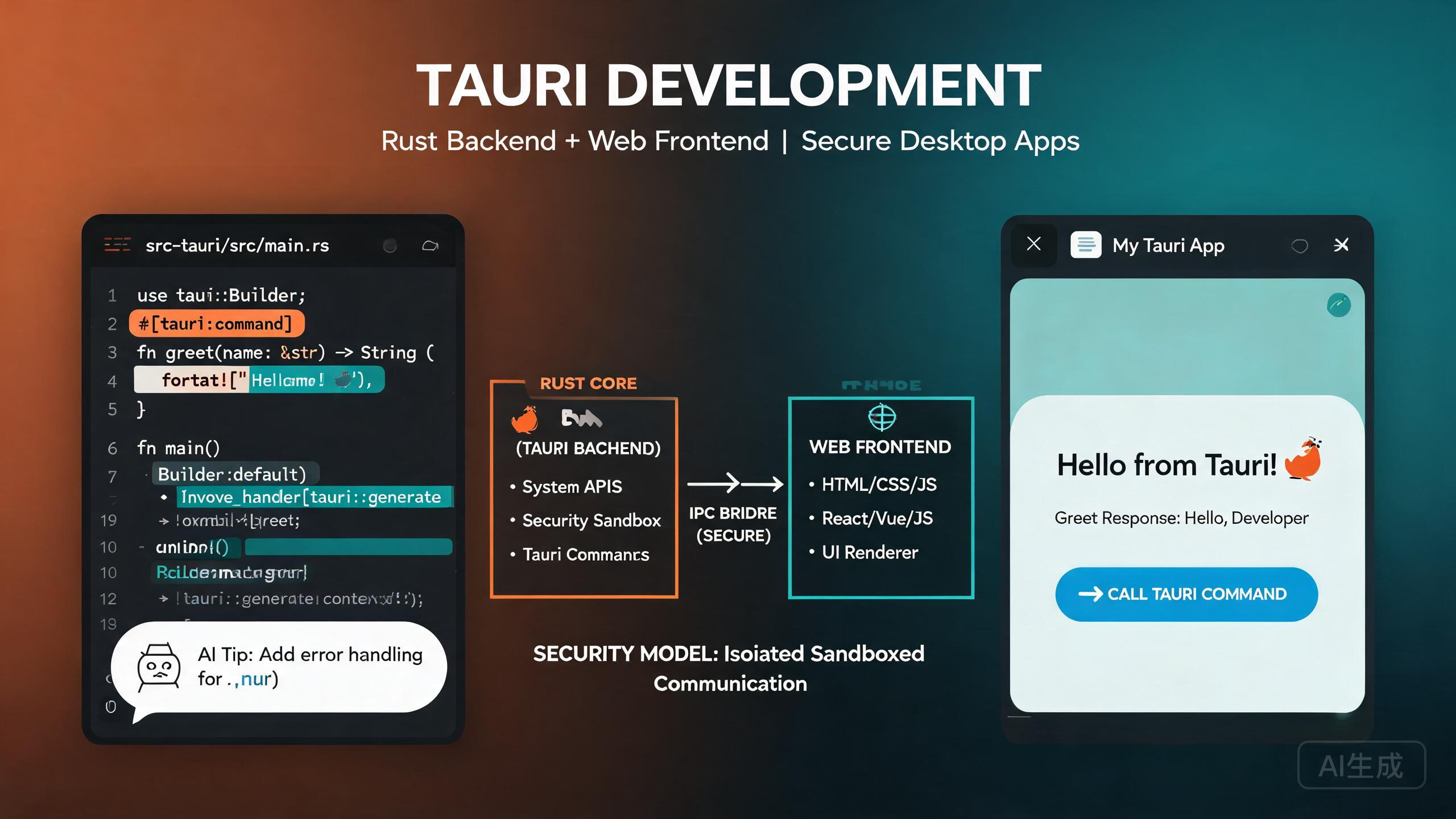
Tauri 是一个通过将 Rust 后端与你选择的 Web 前端相结合来构建小巧、快速且安全的桌面应用的框架。与 Electron 不同,Tauri 使用操作系统原生 webview 而非捆绑 Chromium,从而显著减小二进制文件大小和内存使用。Cursor 是一款 AI 驱动的 IDE 编辑器,通过搭建项目脚手架、生成 Rust 命令、编写类型安全的 TypeScript 绑定以及审查安全配置来加速 Tauri 开发。本指南涵盖 Tauri 架构、Rust 命令、插件系统、安全模型以及 AI 辅助的桌面集成。
前提条件
在开始之前,请确保你具备以下条件:
- Cursor(建议使用最新版本)作为你的 IDE 编辑器
- Rust 工具链(通过 rustup 安装),使用稳定版编译器
- Node.js 18 或更高版本,用于前端工具
- 系统依赖:在 Linux 上安装
webkit2gtk、build-essential和相关包;在 macOS 上安装 Xcode Command Line Tools;在 Windows 上安装 Visual Studio C++ Build Tools
如果你从未编写过 Rust,请让 Cursor 用 Tauri 命令处理器的示例来解释所有权、借用和生命周期。尽早理解这些概念可以避免那些对从 JavaScript 转向 Rust 的开发者来说感觉晦涩的编译器错误。
理解 Tauri 架构
Tauri 应用有三层:
- 前端:你的 Web 应用(React、Vue、Svelte 或纯 HTML)。它在操作系统原生 webview 中运行。
- 核心(Rust):Tauri 运行时用 Rust 编写,管理窗口、应用生命周期和原生系统调用。
- 命令:前端通过 Tauri 的 IPC 层调用的自定义 Rust 函数。这是你的 Web UI 与文件系统、数据库和操作系统 API 交互的方式。
与 Electron 的关键区别在于 Rust 核心拥有完全的系统访问权限,而前端在 webview 中被沙箱化。通信仅通过显式声明的命令和事件进行。
在 Cursor 中搭建项目脚手架
让 Cursor 搭建一个 Tauri + React + TypeScript 项目:
Create a Tauri 2.0 project with React and TypeScript.
Set up the frontend with Vite, configure the Rust backend,
and include the tauri-plugin-fs and tauri-plugin-dialog plugins.
Cursor 会生成标准的 Tauri 项目结构:
my-tauri-app/
  src/                    # Frontend source
    App.tsx
    main.tsx
  src-tauri/              # Rust backend
    src/
      main.rs
      lib.rs
    Cargo.toml
    tauri.conf.json
    capabilities/
      default.json
  package.json
  vite.config.ts
Tauri 2.0 相比 Tauri 1.x 引入了重大变化,包括新的权限系统、capabilities 文件和重新设计的插件 API。如果你在参考旧教程,请验证 API 调用是否匹配 Tauri 2.0 语法。让 Cursor 迁移你遇到的任何 Tauri 1.x 代码。
Rust 后端与命令
命令是你的 Rust 后端与 Web 前端之间的桥梁。你定义一个 Rust 函数,用 #[tauri::command] 标注,然后从 JavaScript 调用它。
定义命令
// src-tauri/src/lib.rs
use serde::{Deserialize, Serialize};
use std::fs;
use std::path::PathBuf;
use tauri::{Manager, State};

// A shared application state managed by Tauri
pub struct AppState {
    pub config_dir: PathBuf,
}

#[derive(Serialize, Deserialize)]
pub struct FileEntry {
    pub name: String,
    pub path: String,
    pub is_dir: bool,
    pub size: u64,
}

/// List files in a directory
#[tauri::command]
pub async fn list_files(dir: String) -> Result<Vec<FileEntry>, String> {
    let entries = fs::read_dir(&dir).map_err(|e| e.to_string())?;

    let mut files: Vec<FileEntry> = entries
        .filter_map(|entry| entry.ok())
        .filter_map(|entry| {
            let metadata = entry.metadata().ok()?;
            Ok(FileEntry {
                name: entry.file_name().to_string_lossy().to_string(),
                path: entry.path().to_string_lossy().to_string(),
                is_dir: metadata.is_dir(),
                size: metadata.len(),
            })
        })
        .collect();

    files.sort_by(|a, b| b.is_dir.cmp(&a.is_dir).then(a.name.cmp(&b.name)));
    Ok(files)
}

/// Save content to a file
#[tauri::command]
pub async fn save_file(path: String, content: String) -> Result<(), String> {
    fs::write(&path, content).map_err(|e| e.to_string())
}

/// Read a file's content
#[tauri::command]
pub async fn read_file(path: String) -> Result<String, String> {
    fs::read_to_string(&path).map_err(|e| e.to_string())
}

/// Get the app data directory
#[tauri::command]
pub fn get_data_dir(state: State<AppState>) -> String {
    state.config_dir.to_string_lossy().to_string()
}

#[cfg_attr(mobile, tauri::mobile_entry_point)]
pub fn run() {
    tauri::Builder::default()
        .plugin(tauri_plugin_fs::init())
        .plugin(tauri_plugin_dialog::init())
        .plugin(tauri_plugin_shell::init())
        .manage(AppState {
            config_dir: tauri::api::path::app_config_dir(
                &tauri::generate_context!(),
            ).unwrap_or_else(|_| PathBuf::from(".")),
        })
        .invoke_handler(tauri::generate_handler![
            list_files,
            save_file,
            read_file,
            get_data_dir,
        ])
        .run(tauri::generate_context!())
        .expect("error while running tauri application");
}
从前端调用命令
// src/lib/tauri-api.ts
import { invoke } from '@tauri-apps/api/core';

export interface FileEntry {
  name: string;
  path: string;
  is_dir: boolean;
  size: number;
}

export async function listFiles(dir: string): Promise<FileEntry[]> {
  return invoke<FileEntry[]>('list_files', { dir });
}

export async function saveFile(path: string, content: string): Promise<void> {
  await invoke('save_file', { path, content });
}

export async function readFile(path: string): Promise<string> {
  return invoke<string>('read_file', { path });
}

export async function getDataDir(): Promise<string> {
  return invoke<string>('get_data_dir');
}
让 Cursor 生成与你的 Rust 结构体对应的 TypeScript 接口。类似"为我的 Tauri 命令处理器中的每个结构体创建 TypeScript 类型并放在共享类型文件中"的提示可确保前端和后端保持同步,在编译时捕获类型不匹配。
Rust 的 Result 类型直接映射到 JavaScript Promise 的拒绝。如果你的命令返回 Result<T, String>,前端会收到一个带有错误字符串的被拒绝 promise。始终在前端用 .catch() 或 try/catch 处理错误,以避免未处理的 promise 拒绝。
插件系统
Tauri 2.0 使用模块化插件架构。文件系统访问、对话框、Shell 命令和 HTTP 请求等核心功能由官方插件提供。你还可以创建自定义插件来在应用间共享功能。
安装官方插件
# File system access
npm install @tauri-apps/plugin-fs
cargo add tauri-plugin-fs --manifest-path src-tauri/Cargo.toml

# Native dialogs (open, save)
npm install @tauri-apps/plugin-dialog
cargo add tauri-plugin-dialog --manifest-path src-tauri/Cargo.toml

# Shell commands (open URLs, run scripts)
npm install @tauri-apps/plugin-shell
cargo add tauri-plugin-shell --manifest-path src-tauri/Cargo.toml

# HTTP client
npm install @tauri-apps/plugin-http
cargo add tauri-plugin-http --manifest-path src-tauri/Cargo.toml
每个插件必须在 Tauri builder 中注册并通过 capabilities 文件授予权限。
使用对话框插件
// src/components/FileBrowser.tsx
import { open, save } from '@tauri-apps/plugin-dialog';
import { readFile, writeFile } from '@tauri-apps/plugin-fs';
import { useState } from 'react';

export function FileBrowser() {
  const [content, setContent] = useState('');
  const [filePath, setFilePath] = useState<string | null>(null);

  async function handleOpen() {
    const selected = await open({
      multiple: false,
      filters: [{ name: 'Markdown', extensions: ['md'] }],
    });

    if (typeof selected === 'string') {
      setFilePath(selected);
      const bytes = await readFile(selected);
      setContent(new TextDecoder().decode(bytes));
    }
  }

  async function handleSave() {
    if (!filePath) return;
    await writeFile(filePath, new TextEncoder().encode(content));
  }

  async function handleSaveAs() {
    const target = await save({
      filters: [{ name: 'Markdown', extensions: ['md'] }],
    });
    if (target) {
      setFilePath(target);
      await writeFile(target, new TextEncoder().encode(content));
    }
  }

  return (
    <div className="flex flex-col h-full">
      <div className="flex gap-2 p-2">
        <button onClick={handleOpen} className="rounded px-3 py-1 bg-blue-600 text-white">
          Open
        </button>
        <button onClick={handleSave} className="rounded px-3 py-1 bg-green-600 text-white">
          Save
        </button>
        <button onClick={handleSaveAs} className="rounded px-3 py-1 bg-gray-600 text-white">
          Save As
        </button>
      </div>
      <textarea
        value={content}
        onChange={(e) => setContent(e.target.value)}
        className="flex-1 p-4 font-mono text-sm"
        placeholder="Select a file or start typing..."
      />
    </div>
  );
}
让 Cursor 搭建一个自定义 Tauri 插件。类似"创建一个 Tauri 插件,暴露一个 Rust 函数来读取系统环境变量并在我的应用中注册"的提示展示了如何构建插件代码、注册权限以及向前端暴露 API。
安全模型
Tauri 2.0 引入了基于 capabilities 的细粒度权限系统。每个命令、插件 API 和资源访问点都必须在 capabilities 文件中显式允许。
Capabilities 配置
// src-tauri/capabilities/default.json
{
  "$schema": "../gen/schemas/desktop-schema.json",
  "identifier": "default",
  "description": "Default capability for the main window",
  "windows": ["main"],
  "permissions": [
    "core:default",
    "fs:allow-read-text-file",
    "fs:allow-write-file",
    "fs:allow-create-dir",
    "dialog:allow-open",
    "dialog:allow-save",
    "shell:allow-open",
    "http:default"
  ]
}
限定文件系统访问范围
你可以使用 scope 规则限制插件可以访问哪些目录:
{
  "identifier": "default",
  "windows": ["main"],
  "permissions": [
    {
      "identifier": "fs:allow-read-file",
      "allow": [
        { "path": "$APPDATA/**" },
        { "path": "$DOCUMENT/**" }
      ],
      "deny": [
        { "path": "$DOCUMENT/.ssh/**" }
      ]
    }
  ]
}
切勿在没有 scope 的情况下使用 fs:default 或 fs:allow-read-file。这些宽泛的权限允许从 webview 访问整个文件系统,这违背了 Tauri 沙箱化架构的初衷。始终将访问范围限定到特定目录,如 $APPDATA 或用户选择的路径。
在 Cursor 中运行此提示来审查你的 Tauri 安全配置:"审查我的 capabilities 文件和 Cargo.toml 中过于宽泛的权限。标记任何在没有显式 scope 的情况下授予文件系统、Shell 或 HTTP 访问权限的权限。"
事件与进程间通信
除了命令之外,Tauri 还支持一个事件系统,用于从 Rust 后端到前端的异步通信。
从 Rust 发射事件
use tauri::{Emitter, Window};
use std::time::Duration;
use tokio::time::interval;

/// Background task that emits progress updates
#[tauri::command]
pub async fn start_processing(window: Window) -> Result<(), String> {
    let mut ticker = interval(Duration::from_millis(500));

    for step in 0..=100 {
        ticker.tick().await;

        window
            .emit("processing-progress", serde_json::json!({
                "step": step,
                "total": 100,
                "message": format!("Processing item {} of 100", step),
            }))
            .map_err(|e| e.to_string())?;

        if step == 50 {
            window
                .emit("processing-warning", "Halfway through, memory is high")
                .map_err(|e| e.to_string())?;
        }
    }

    window
        .emit("processing-complete", "All items processed successfully")
        .map_err(|e| e.to_string())?;

    Ok(())
}
在前端监听事件
// src/components/ProcessingView.tsx
import { listen } from '@tauri-apps/api/event';
import { useEffect, useState } from 'react';

interface ProgressEvent {
  step: number;
  total: number;
  message: string;
}

export function ProcessingView() {
  const [progress, setProgress] = useState<ProgressEvent | null>(null);
  const [warning, setWarning] = useState<string | null>(null);
  const [done, setDone] = useState(false);

  useEffect(() => {
    const unlisteners: Array<() => void> = [];

    const setup = async () => {
      unlisteners.push(
        await listen<ProgressEvent>('processing-progress', (event) => {
          setProgress(event.payload);
        })
      );

      unlisteners.push(
        await listen<string>('processing-warning', (event) => {
          setWarning(event.payload);
        })
      );

      unlisteners.push(
        await listen<string>('processing-complete', (event) => {
          setDone(true);
        })
      );
    };

    setup();

    return () => {
      unlisteners.forEach((unlisten) => unlisten());
    };
  }, []);

  return (
    <div className="p-4">
      {progress && (
        <>
          <div className="mb-2 text-sm text-gray-600">{progress.message}</div>
          <div className="h-3 rounded-full bg-gray-200">
            <div
              className="h-3 rounded-full bg-blue-600 transition-all"
              style={{ width: `${(progress.step / progress.total) * 100}%` }}
            />
          </div>
        </>
      )}
      {warning && (
        <div className="mt-2 rounded bg-yellow-100 p-2 text-sm text-yellow-800">
          {warning}
        </div>
      )}
      {done && (
        <div className="mt-4 rounded bg-green-100 p-2 text-sm text-green-800">
          Processing complete!
        </div>
      )}
    </div>
  );
}
始终在 React useEffect 清理函数中清理事件监听器。Tauri 事件监听器在组件重新挂载后仍然存在。未取消订阅会导致重复的处理器多次触发并产生内存泄漏。
AI 辅助桌面集成
Cursor 可以通过描述所需行为来生成完整的桌面集成功能。以下是实际示例。
系统托盘集成
Create a Tauri system tray icon with a context menu containing
"Show Window", "Settings", and "Quit". The tray icon should show
a notification badge when there are unread items. Write the Rust
code in src-tauri/src/tray.rs and register it in the builder.
Cursor 生成:
// src-tauri/src/tray.rs
use tauri::{
    menu::{Menu, MenuItem, PredefinedMenuItem},
    tray::{TrayIconBuilder, TrayIconEvent, MouseButton, MouseButtonState},
    Manager, Emitter,
};

pub fn setup_tray(app: &tauri::App) -> tauri::Result<()> {
    let show = MenuItem::with_id(app, "show", "Show Window", true, None)?;
    let settings = MenuItem::with_id(app, "settings", "Settings", true, None)?;
    let separator = PredefinedMenuItem::separator(app)?;
    let quit = MenuItem::with_id(app, "quit", "Quit", true, None)?;

    let menu = Menu::with_items(app, &[&show, &settings, &separator, &quit])?;

    TrayIconBuilder::new()
        .icon(app.default_window_icon().unwrap().clone())
        .tooltip("My Tauri App")
        .menu(&menu)
        .on_menu_event(|app, event| {
            match event.id().as_ref() {
                "show" => {
                    if let Some(window) = app.get_webview_window("main") {
                        let _ = window.show();
                        let _ = window.set_focus();
                    }
                }
                "settings" => {
                    if let Some(window) = app.get_webview_window("main") {
                        let _ = window.emit("navigate", "/settings");
                        let _ = window.show();
                        let _ = window.set_focus();
                    }
                }
                "quit" => {
                    app.exit(0);
                }
                _ => {}
            }
        })
        .on_tray_icon_event(|tray, event| {
            if let TrayIconEvent::Click {
                button: MouseButton::Left,
                button_state: MouseButtonState::Up,
                ..
            } = event
            {
                let app = tray.app_handle();
                if let Some(window) = app.get_webview_window("main") {
                    let _ = window.show();
                    let _ = window.set_focus();
                }
            }
        })
        .build(app)?;

    Ok(())
}
系统托盘图标在不同平台上的行为不同。在 macOS 上,点击托盘图标应切换窗口可见性。在 Windows 和 Linux 上,右键点击打开上下文菜单。让 Cursor 生成平台特定的处理器,并在发布前在所有目标平台上测试。
构建与分发
Tauri 为每个平台构建原生二进制文件,无外部运行时依赖。
构建命令
# Build for the current platform
npm run tauri build

# Build with a specific bundle type
npm run tauri build -- --bundles dmg    # macOS DMG
npm run tauri build -- --bundles nsis  # Windows NSIS installer
npm run tauri build -- --bundles deb   # Linux DEB

# Debug build with devtools
npm run tauri build -- --debug
配置
// src-tauri/tauri.conf.json
{
"$schema": "https://schema.tauri.app/config/2",
"productName": "My Tauri App",
"version": "1.0.0",
"identifier": "com.example.my-tauri-app",
"build": {
"frontendDist": "../dist",
"devUrl": "http://localhost:1420",
"beforeDevCommand": "npm run dev",
"beforeBuildCommand": "npm run build"
},
"app": {
"windows": [
{
"title": "My Tauri App",
"width": 1200,
"height": 800,
"minWidth": 800,
"minHeight": 600,
"resizable": true,
"center": true,
"decorations": true
}
],
"security": {
"csp": "default-src 'self'; img-src 'self' data:; style-src 'self' 'unsafe-inline'",
"freezePrototype": true
}
},
"bundle": {
"active": true,
"targets": "all",
"icon": [
"icons/32x32.png",
"icons/128x128.png",
"icons/icon.icns",
"icons/icon.ico"
]
}
}
让 Cursor 生成一个 GitHub Actions CI 工作流,为 macOS、Windows 和 Ubuntu 构建 Tauri 应用。类似"创建一个 CI 工作流,安装 Rust、Node 和 Tauri 的系统依赖,然后在三个平台上运行 tauri build 并将构建包作为 release 资产上传"的提示可以给你一个生产就绪的流水线。
总结
在 Cursor 中使用 Tauri 让你兼得两全之美:一个小巧安全的 Rust 核心,搭配熟悉的 Web 前端。遵循本指南中的模式——类型化 Rust 命令、有范围的插件权限、基于 capabilities 的安全、事件驱动通信和平台感知的桌面集成——你可以发布比 Electron 等价物小一个数量级的轻量级桌面应用。保持 capabilities 文件范围严格,让 Cursor 生成和审查你的 Rust 命令,并始终在每个目标操作系统上测试平台特定的功能。