Prisma ORM Development in Cursor: A Complete Guide
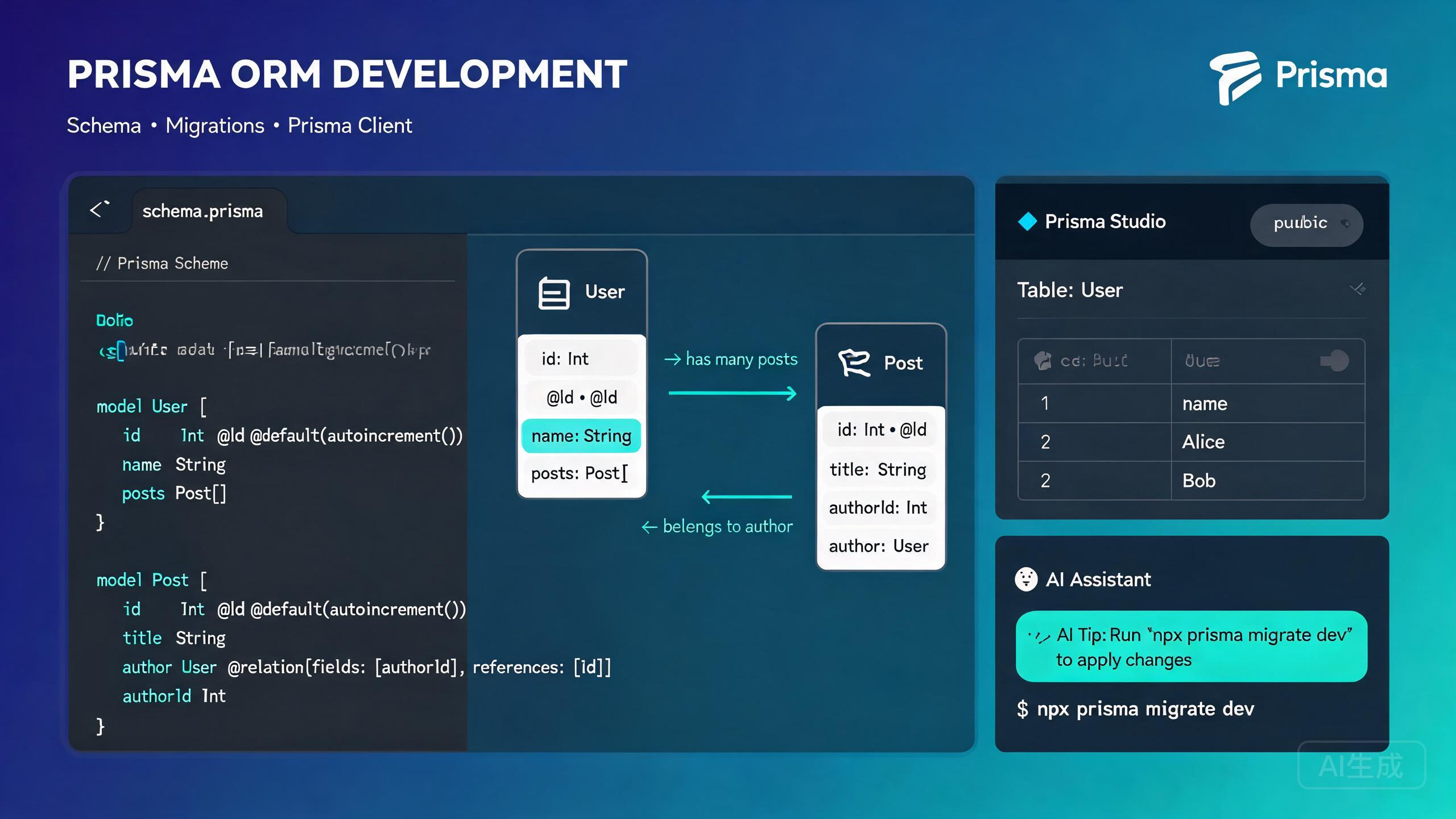
Prisma is a next-generation TypeScript ORM that provides a type-safe database client, declarative schema migrations, and a visual database browser called Prisma Studio. Prisma eliminates boilerplate database access code and catches query errors at compile time. Cursor, with its integrated AI assistant and VS Code-compatible foundation, is an excellent editor for Prisma development -- it provides IntelliSense for the Prisma schema language, auto-completes Prisma Client queries, and can generate complete schemas from natural-language descriptions.
This guide covers the complete Prisma development workflow in Cursor: installation and setup, schema design, migrations, Prisma Client queries, relations, Prisma Studio, and AI-assisted schema generation.
Installing and Setting Up Prisma in Cursor
Prerequisites
Prisma works with Node.js 18+ and supports PostgreSQL, MySQL, SQLite, MongoDB, and SQL Server. Verify your Node.js version:
node --version
Cursor's integrated terminal (Ctrl+`) stays in sync with the Explorer panel. You can run Prisma CLI commands and immediately see generated files appear in the file tree.
Installing the Prisma Extension
Cursor inherits VS Code extension compatibility. Install the official Prisma extension from the Extensions view (Ctrl+Shift+X):
- Search for "Prisma".
- Install the extension published by Prisma.
- Reload Cursor if prompted.
The extension provides:
- Syntax highlighting for
.prismaschema files. - Auto-formatting on save.
- IntelliSense for model fields, attributes, and relations.
- Inline validation for schema errors.
- Code actions for quick fixes.
If the Prisma extension is not installed, Cursor will treat .prisma files as plain text. You will lose syntax highlighting, autocomplete, and error detection. Always install the official extension before editing schema files.
Initializing Prisma in a Project
Install the Prisma CLI and initialize a new Prisma setup:
npm install prisma --save-dev
npm install @prisma/client

npx prisma init
This creates:
prisma/schema.prisma-- the main schema file..env-- environment file with aDATABASE_URLplaceholder.
Set your database connection string in .env:
# .env
DATABASE_URL="postgresql://user:password@localhost:5432/mydb?schema=public"
Ask Cursor: "Set up Prisma with PostgreSQL in my project. Create the schema file with a User model and configure the database connection." Cursor will run the init commands, generate the schema, and set up the .env file.
Schema Design
The Prisma schema is the single source of truth for your database structure. It defines models, relations, enums, and datasource configuration.
Understanding the Schema File
// prisma/schema.prisma

// Generator: tells Prisma how to generate the client
generator client {
  provider = "prisma-client-js"
  previewFeatures = ["fullTextSearch", "postgresqlExtensions"]
}

// Datasource: database connection
datasource db {
  provider = "postgresql"
  url      = env("DATABASE_URL")
  extensions = [pgcrypto, postgis]
}

// Model: maps to a database table
model User {
  id        String   @id @default(uuid())
  email     String   @unique
  name      String?
  role      Role     @default(USER)
  posts     Post[]
  profile   Profile?
  createdAt DateTime @default(now())
  updatedAt DateTime @updatedAt
}

model Post {
  id          String   @id @default(uuid())
  title       String
  content     String?
  published   Boolean  @default(false)
  viewCount   Int      @default(0)
  author      User     @relation(fields: [authorId], references: [id])
  authorId    String
  categories  Category[]
  createdAt   DateTime @default(now())
  updatedAt   DateTime @updatedAt

  @@index([authorId])
  @@index([published])
}

model Category {
  id    String @id @default(uuid())
  name  String @unique
  posts Post[]
}

model Profile {
  id      String   @id @default(uuid())
  bio     String?
  user    User     @relation(fields: [userId], references: [id])
  userId  String   @unique
}

enum Role {
  USER
  ADMIN
  EDITOR
}
Common Field Attributes
| Attribute | Description |
|---|---|
@id | Marks a field as the primary key |
@default(uuid()) | Auto-generates a UUID on insert |
@default(autoincrement()) | Auto-incrementing integer (MySQL/PostgreSQL) |
@unique | Enforces uniqueness on the field |
@updatedAt | Auto-updates timestamp on record update |
@relation | Defines a relation between models |
@map | Maps a field to a differently-named column |
@@index | Creates a database index on the field(s) |
@@unique | Composite unique constraint |
@@map | Maps a model to a differently-named table |
Ask Cursor: "Generate a Prisma schema for an e-commerce platform with User, Product, Order, OrderItem, and Category models. Include appropriate relations, indexes, and enums for order status and product availability." Cursor will produce a complete, validated schema with correct relation syntax.
Relations
Prisma supports one-to-one, one-to-many, and many-to-many relations.
One-to-One:
model User {
  id      String   @id @default(uuid())
  profile Profile?
}

model Profile {
  id     String @id @default(uuid())
  user   User   @relation(fields: [userId], references: [id])
  userId String @unique
}
One-to-Many:
model User {
  id    String @id @default(uuid())
  posts Post[]
}

model Post {
  id       String @id @default(uuid())
  author   User   @relation(fields: [authorId], references: [id])
  authorId String
}
Many-to-Many (implicit):
model Post {
  id         String     @id @default(uuid())
  categories Category[]
}

model Category {
  id    String @id @default(uuid())
  posts Post[]
}
Many-to-Many (explicit, with extra fields on the join table):
model Post {
  id       String      @id @default(uuid())
  tags     PostTag[]
}

model Tag {
  id    String   @id @default(uuid())
  posts PostTag[]
}

model PostTag {
  post      Post   @relation(fields: [postId], references: [id])
  postId    String
  tag       Tag    @relation(fields: [tagId], references: [id])
  tagId     String
  assignedAt DateTime @default(now())

  @@id([postId, tagId])
}
When using implicit many-to-many relations, Prisma auto-generates a hidden join table. You cannot add extra fields (like assignedAt or createdBy) to this hidden table. If you need metadata on the relation, use an explicit join table as shown above.
Migrations
Prisma Migrate creates and applies database schema changes in a versioned, reversible way.
Creating Your First Migration
After defining your schema, create the initial migration:
npx prisma migrate dev --name init
This command:
- Generates a SQL migration file in
prisma/migrations/. - Applies the migration to your database.
- Regenerates the Prisma Client.
Use descriptive migration names: npx prisma migrate dev --name add_order_status_enum. These names appear in the migration history and help you track schema evolution.
Modifying the Schema
When you change the schema, create a new migration:
# After editing schema.prisma
npx prisma migrate dev --name add_post_view_count
Prisma detects the diff between your schema and the database, generates a migration, and applies it.
Migration Workflow for Production
For production databases, use prisma migrate deploy which applies pending migrations without resetting data:
# Apply migrations in production
npx prisma migrate deploy
Never run prisma migrate dev against a production database. The dev command can reset the database if it detects schema drift. Always use migrate deploy in production environments.
Resetting the Database
During development, you may need to reset the database and re-apply all migrations:
npx prisma migrate reset
This drops all data and tables, then re-applies all migrations from scratch.
Seeding the Database
Create a seed script to populate your database with initial data:
// prisma/seed.ts
import { PrismaClient } from '@prisma/client';
const prisma = new PrismaClient();
async function main() {
// Create users
const alice = await prisma.user.create({
data: {
name: 'Alice Johnson',
role: 'ADMIN',
profile: {
create: {
bio: 'Software engineer and blogger',
},
},
},
});
const bob = await prisma.user.create({
data: {
name: 'Bob Smith',
role: 'USER',
},
});
// Create posts
const post1 = await prisma.post.create({
data: {
title: 'Getting Started with Prisma',
content: 'Prisma is a type-safe ORM...',
published: true,
author: { connect: { id: alice.id } },
},
});
const post2 = await prisma.post.create({
data: {
title: 'Advanced Prisma Relations',
content: 'Relations in Prisma...',
published: true,
author: { connect: { id: alice.id } },
},
});
console.log('Seed data created successfully');
}
main()
.catch((e) => {
console.error(e);
process.exit(1);
})
.finally(async () => {
await prisma.$disconnect();
});
Configure the seed command in package.json:
{
  "prisma": {
    "seed": "tsx prisma/seed.ts"
  }
}
Run the seed:
npx prisma db seed
Ask Cursor: "Create a seed script for my Prisma schema with 5 users, 20 posts, and 10 categories. Make sure some posts are unpublished and some users have profiles while others do not." Cursor will generate a realistic seed script that exercises all relation types.
Prisma Client Queries
Prisma Client is the auto-generated, type-safe query builder that replaces traditional ORM models and raw SQL.
Instantiating the Client
Create a singleton instance to avoid multiple connections in development:
// lib/prisma.ts
import { PrismaClient } from '@prisma/client';

const globalForPrisma = globalThis as unknown as {
  prisma: PrismaClient | undefined;
};

export const prisma =
  globalForPrisma.prisma ??
  new PrismaClient({
    log: ['query', 'info', 'warn', 'error'],
  });

if (process.env.NODE_ENV !== 'production') {
  globalForPrisma.prisma = prisma;
}
In development with hot module reloading, creating a new PrismaClient on every file change causes connection pool exhaustion. The singleton pattern above prevents this by caching the instance on globalThis.
CRUD Operations
Create:
// Create a single record
const user = await prisma.user.create({
data: {
name: 'Charlie Brown',
profile: {
create: {
bio: 'New user bio',
},
},
},
});
// Create multiple records
const users = await prisma.user.createMany({
data: [
],
});
Read:
// Find a single record
const user = await prisma.user.findUnique({
include: { profile: true, posts: true },
});
// Find multiple records with filtering and sorting
const publishedPosts = await prisma.post.findMany({
where: { published: true },
orderBy: { createdAt: 'desc' },
take: 10,
skip: 0,
include: {
author: {
select: { id: true, name: true, email: true },
},
},
});
// Count records
const totalPosts = await prisma.post.count({
where: { published: true },
});
Update:
// Update a single record
const updatedPost = await prisma.post.update({
  where: { id: postId },
  data: {
    title: 'Updated Title',
    viewCount: { increment: 1 },
  },
});

// Update multiple records
const result = await prisma.post.updateMany({
  where: { published: false, authorId: userId },
  data: { published: true },
});
Delete:
// Delete a single record
const deletedUser = await prisma.user.delete({
  where: { id: userId },
});

// Delete multiple records
const result = await prisma.post.deleteMany({
  where: { authorId: userId, published: false },
});
Advanced Filtering
const posts = await prisma.post.findMany({
  where: {
    AND: [
      { published: true },
      {
        OR: [
          { title: { contains: 'prisma', mode: 'insensitive' } },
          { content: { contains: 'orm', mode: 'insensitive' } },
        ],
      },
    ],
    createdAt: {
      gte: new Date('2024-01-01'),
      lte: new Date('2024-12-31'),
    },
    author: {
      role: { in: ['ADMIN', 'EDITOR'] },
    },
  },
  orderBy: [{ viewCount: 'desc' }, { createdAt: 'desc' }],
});
Transactions
// Interactive transaction
const result = await prisma.$transaction(async (tx) => {
const author = await tx.user.create({
});
const post = await tx.post.create({
data: {
title: 'My First Post',
content: 'Hello world',
authorId: author.id,
},
});
await tx.profile.create({
data: {
bio: 'New author profile',
userId: author.id,
},
});
return { author, post };
});
Ask Cursor: "Write a Prisma transaction that transfers credits between two users. Deduct from sender, add to receiver, and create a transfer record. Roll back if the sender has insufficient balance." Cursor will generate the interactive transaction with proper error handling.
Pagination
// Offset-based pagination
const page = 1;
const pageSize = 10;

const [posts, totalCount] = await prisma.$transaction([
  prisma.post.findMany({
    where: { published: true },
    orderBy: { createdAt: 'desc' },
    skip: (page - 1) * pageSize,
    take: pageSize,
    include: { author: true },
  }),
  prisma.post.count({ where: { published: true } }),
]);

const totalPages = Math.ceil(totalCount / pageSize);
Prisma Studio
Prisma Studio is a visual database browser that runs in your browser. It lets you view, create, update, and delete records without writing queries.
Launching Prisma Studio
npx prisma studio
This opens a browser interface at http://localhost:5555 where you can:
- Browse all models defined in your schema.
- View records in a sortable, filterable table.
- Create new records with a form interface.
- Edit existing records by clicking on cells.
- Delete records with a confirmation dialog.
- Filter and search records by field values.
Prisma Studio is invaluable for debugging during development. Instead of writing throwaway queries, launch Studio, inspect your data, and make quick edits. It reflects changes in real time.
Prisma Studio writes directly to your database. Be careful when using it against a production database -- there is no undo for deletions or edits. Always back up your data before making manual changes in Studio.
Filtering in Studio
Prisma Studio supports filtering by:
- Field name (select any column).
- Filter operator (equals, not equals, contains, starts with, ends with, etc.).
- Multiple filters combined with AND/OR logic.
AI-Assisted Schema Generation in Cursor
Cursor's AI assistant excels at generating Prisma schemas, queries, and migration strategies from natural-language descriptions.
Generating a Schema from a Description
Open Cursor Chat (Ctrl+L) and describe your data model:
Generate a Prisma schema for a project management application with these models:
- User (id, email, name, avatar, role enum: ADMIN/MEMBER/VIEWER)
- Workspace (id, name, slug, ownerId)
- Project (id, name, description, workspaceId, status enum)
- Task (id, title, description, status, priority, assigneeId, projectId, dueDate)
- Comment (id, content, authorId, taskId)
- Label (id, name, color, projectId)
Include all necessary relations, indexes on foreign keys, and timestamps.
Use PostgreSQL with UUID primary keys.
Cursor will generate a complete schema with all models, relations, enums, and indexes. The generated schema includes User, Workspace, Project, Task, Comment, and Label models with proper foreign key relations, composite unique constraints, and database indexes on all foreign key columns.
When asking Cursor to generate schemas, specify the database provider (PostgreSQL, MySQL, etc.), primary key type (UUID vs. autoincrement), and whether you need indexes. This ensures the generated schema uses database-specific features correctly.
AI-Assisted Query Generation
Ask Cursor to write complex queries:
Write a Prisma query to fetch the top 5 most active users in a workspace,
sorted by the number of completed tasks. Include each user's name, email,
avatar, and task count. Only count tasks created in the last 30 days.
const thirtyDaysAgo = new Date();
thirtyDaysAgo.setDate(thirtyDaysAgo.getDate() - 30);

const topUsers = await prisma.user.findMany({
  where: {
    assignedTasks: {
      some: {
        status: 'DONE',
        createdAt: { gte: thirtyDaysAgo },
        project: { workspaceId },
      },
    },
  },
  select: {
    id: true,
    name: true,
    email: true,
    avatar: true,
    _count: {
      select: {
        assignedTasks: {
          where: {
            status: 'DONE',
            createdAt: { gte: thirtyDaysAgo },
          },
        },
      },
    },
  },
  orderBy: {
    assignedTasks: {
      _count: 'desc',
    },
  },
  take: 5,
});
Prisma's _count with nested filtering can generate expensive SQL queries. Always check the generated SQL (enable query logging with new PrismaClient({ log: ['query'] })) and add appropriate database indexes to avoid full table scans.
Conclusion
Prisma paired with Cursor creates a streamlined database development experience. The declarative schema file serves as a single source of truth, migrations provide a safe path for schema evolution, the type-safe Prisma Client catches query errors at compile time, and Prisma Studio offers a visual interface for data inspection. Cursor's AI assistant accelerates every step -- from generating complete schemas for complex domain models to writing optimized queries with nested includes and aggregations. Start by installing the Prisma extension, define your models with proper relations and indexes, use migrate dev during development and migrate deploy in production, and let Cursor generate the repetitive boilerplate so you can focus on your application's data layer.